
App of the Week: ST.E.V.E.
STudio for Equation Visualization and Experimentation

I’m happy to officially announce the release of my STudio for Equation Visualization and Experimentation, or more simply, ST.E.V.E. The idea is simple. There are countless graphing calculator programs that let you visualize 3-dimensional equations. There are also many sophisticated rendering apps for creating 3D scenes with controls for lighting, shadows, reflections, materials, etc. However, what I’ve never seen is an app that does both: a 3D graphing program with advanced (but easy to use) rendering controls. Such an app would have the ability to make mathematics really beautiful, and it’s a little shocking it doesn’t seem to exist. Until now! I began working on this app in early February, when the best available coding models were GPT 5.4 and Opus 4.7, and I’ve returned to it periodically as newer models have appeared. I believe its now finished! The making of this app is an interesting story in its own right. Scroll down for that.
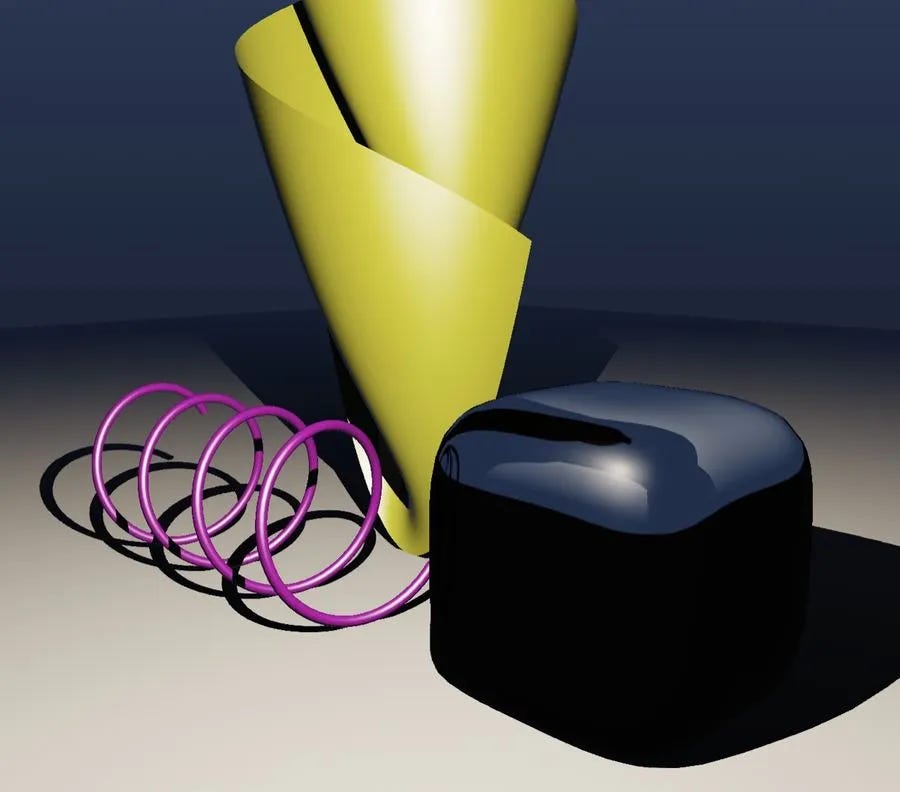
STEVE is capable of creating reflective, mirror-like surfaces, as well as glass-like surfaces where you can set the index of refraction. You have a variety of lighting options, and can control how each casts shadows. In the video clip below you see several of these effects. Note the subtle reflections in the ground plane, the way the reflection of the cubical surface in the mirrored torus changes as the camera orbits around it, and the way the scene distorts in the glass-like sphere.
You can also set an emission level for objects to create a glowing effect, and emissive surfaces get a nice halo.
With all that said, powerful rendering functionality isn’t enough. STEVE has to be a great 3D graphing app, too. Of course, you can just type in a function like x^2+y^2 and see its graph. However, you can also plot several other types of objects, like parameterized curves, parameterized surfaces, and implicitly defined surfaces. One nice feature is that if you introduce a variable it automatically becomes an adjustable value, controllable with a slider. If you set a continuous range for that value you can also animate it, as in the clip below.
Variables can also be restricted to a discrete set of values, making it easy to display multiple related curves or surfaces:
STEVE has some really useful import/export features, too. You can save and import projects, export the current canvas as a high-resolution PNG suitable for including in publications, and export surfaces as STL files for 3D printing. You can also activate a turntable view to orbit around a scene. (The above clips are just screen recordings of this feature.)
There are many, many more features to play with: curves render as adjustable radius tubes, surfaces can be decorated with uv-grids or contours, etc., etc., etc. A full set of instructions and descriptions of everything it can do are on its github page, here.
While the official full name of STEVE is the STudio for Equation Visualization and Experimentation, unofficially it was named after my friend Steve Trettel. Steve is a wizard at programming shaders to make beautiful visualizations of mathematics. The pictures alone make his website worth a visit! His work is really what inspired me to make this app
Click the image below to try STEVE. Then be sure to keep scrolling for the story of how it was made.

The Making of STEVE
The development story of STEVE is a good illustration of how model capabilities have changed over the last few months. In November of 2025, I don’t believe there were any coding models good enough to even get started with an app like this. That changed in December with the release of Anthropic’s Opus 4.7, and in January with OpenAI’s GPT 5.4. I started developing STEVE in early February, and I went with GPT 5.4 because at the time OpenAI was giving people a lot of access for just $20/month. Unfortunately, GPT 5.4 struggled. After about a week or two of fighting with it just to make a prototype, I completely gave up, deleted everything, and started again from scratch. I’d learned some lessons along the way, which helped me write a better initial prompt the second time around, enabling me to go much further. One compromise at the time was to scale back my ambitions and drop reflections, refractions, and luminosity.
GPT 5.5 came out in March and was definitely a leap forward. I used it to add a lot of features and eventually settled on a beta version that I started sharing with people. However, more advanced capabilities like good reflective surfaces remained out of reach. At that point I set the project aside and just left it up on my web page for anyone to play with.
Last week I dug it out of the closet and fed it to Anthropic’s Fable 5, along with my wish list of all the features I wanted that I could never get GPT 5.5 to implement. I also asked it to clean up the code and find and fix any bugs. It then chugged away for a while, and voilà! It implemented every one of the features I had dreamed of, found (and fixed) a whole bunch of bugs, cleaned up the codebase, and suggested several more improvements. Unfortunately, at that point I ran out of Fable credits.
Fortunately, OpenAI had just released their next-generation model, GPT 5.6 Sol. It had no problem implementing all of Fable’s suggestions, as well as about 20 more that I decided to add.
Unless users request more features, I think STEVE is now done. It’s really my first full-featured production-grade app, and I’m looking forward to hearing what people think. If you play with it, drop me a note or just leave a comment below and let me know what you think! Here again is a link to the app: STEVE.
David Bachman is a professor of Mathematics, Data Science, and Computer Science. He writes about AI and its real-world impacts. To learn more about his academic work, mathematical art, or AI speaking, consulting, and curriculum development, visit davidbachmandesign.com.